
Contents
What Is RealVR ?
RealVR is a virtual reality adult content platform that aggregates and hosts VR videos designed for headset playback. If you have landed on this page, you probably already own a VR headset — or you are thinking about getting one — and you want to know whether Realvr.com is worth your time. Fair question. The VR content landscape in 2026 is crowded, and not every platform delivers the same experience.
RealVR positions itself as a hub for high-quality, immersive VR video content. The platform supports most major headsets, including Meta Quest 3, Apple Vision Pro, PSVR2, and various PCVR setups. Content is typically shot in stereoscopic 3D with 180-degree or 360-degree fields of view, which means when you turn your head, the scene moves with you. That level of immersion is the whole selling point of VR content over traditional flat video.
The platform has built a reputation around its library size and streaming quality. Videos on RealVR are available in resolutions up to 8K, which matters more than you might think. Lower resolution VR content looks blurry and breaks immersion fast. At 8K, the pixel density is high enough that the screen-door effect — that visible grid pattern between pixels — is nearly eliminated on modern headsets.
How Realvr.com Works
Realvr.com operates on a freemium model. You can browse a selection of content without paying, but full-length videos and the highest resolution streams sit behind a subscription. The site functions both as a browser-based platform and through a dedicated VR app that you can sideload onto standalone headsets.
Accessing Content Through a Browser
On desktop or mobile, Realvr.com works like most video platforms. You search, browse categories, and select a video. If you are using a PCVR setup tethered to your computer, you can stream directly from the browser through compatible VR players like DeoVR or SkyboxVR. The site pushes content through adaptive bitrate streaming, which adjusts video quality based on your internet connection speed in real time.
Using the Dedicated VR App
The standalone app experience is where RealVR pulls ahead of some competitors. Rather than fumbling with browser tabs inside a headset — which is awkward even on the best hardware — the app provides a native VR interface. You browse thumbnails in a virtual environment, select your content, and playback begins without leaving the VR space. Load times vary depending on your connection, but on a stable 100 Mbps line, buffering is minimal even at higher resolutions.
Supported Headsets and Compatibility
RealVR supports a wide range of hardware. Here is what works as of early 2026:
Meta Quest 2, Quest 3, and Quest 3S all run the app natively. Apple Vision Pro users can access content through the browser with a compatible player. PSVR2 support is limited to sideloaded solutions, which requires a bit more technical effort. PCVR headsets like the Valve Index, HP Reverb G2, and Bigscreen Beyond work through desktop streaming. Pico 4 and other standalone Android-based headsets can sideload the app with some configuration.
Compatibility is not usually the issue. The real variable is your internet speed and the processing power of your headset when it comes to decoding high-resolution video streams.
Benefits of Using RealVR
There are practical reasons people gravitate toward RealVR over other platforms. Some of these come down to content library depth. Others are about user experience and technical quality.
Large and Regularly Updated Library
RealVR aggregates content from multiple VR studios. That means you are not locked into one production company’s style or performer roster. The library spans thousands of videos, with new uploads appearing weekly. For users who want variety without subscribing to five different platforms, this consolidation matters.
High Resolution Streaming
Resolution is not a vanity metric in VR. It directly affects how real a scene feels. RealVR offers content up to 8K, and the platform’s encoding pipeline is optimized for VR playback. Videos use the h.265 codec at high bitrates, which preserves detail in motion-heavy scenes where older codecs would introduce artifacts and compression blur.
User Interface Designed for VR
Navigating a website inside a VR headset is painful. Tiny text, imprecise cursor controls, pages that were never designed for head-tracked browsing. RealVR’s native app sidesteps all of that. The interface uses large, readable thumbnails, gaze-based or controller-based navigation, and minimal menu layers. You get to content faster, which is the whole point.
Free Content Tier
Not every platform gives you anything without a credit card. RealVR offers a selection of free videos — usually shorter or older content — that lets you evaluate the platform and test your hardware setup before committing money. That is a low-risk entry point, and it is one of the reasons the platform has grown its user base steadily.
Cross-Device Syncing
If you create an account on Realvr.com, your watch history, favorites, and subscription status carry across devices. Start browsing on your phone, pick up on your headset. Minor feature, but it reduces friction.
Potential Drawbacks to Consider
No platform is without trade-offs. Here are the ones worth knowing about before you commit.
Subscription Cost
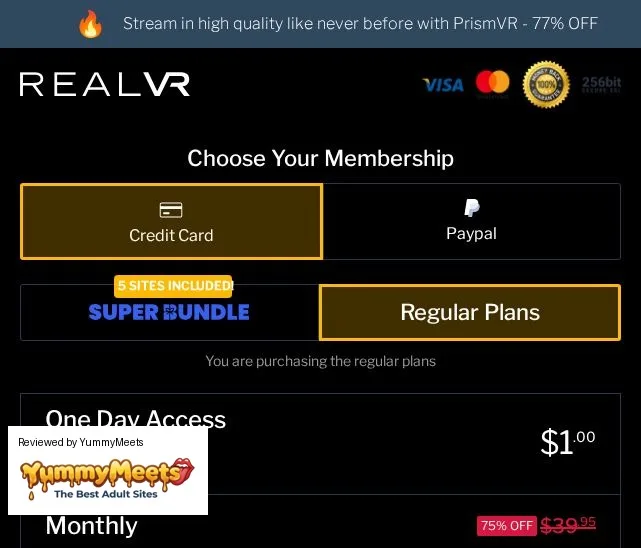
Premium access to RealVR is not free. Monthly pricing is comparable to other VR content platforms, typically ranging between $15 and $30 per month depending on the plan tier. Annual plans reduce the per-month cost, but the upfront payment is higher. Whether the cost is justified depends on how frequently you use VR content and whether the library covers what you are looking for.
Internet Speed Requirements
Streaming 8K VR video requires bandwidth. RealVR recommends at least 50 Mbps for smooth 4K playback and 100 Mbps or more for 8K. If your connection is inconsistent or below those thresholds, you will experience buffering, resolution drops, or both. Downloading videos for offline playback is an option on premium plans, but that requires storage space on your device — and 8K VR files are large, often exceeding 10 GB per video.
Content Exclusivity Varies
Because RealVR aggregates from multiple studios, some of the content available on the platform can also be found on studio-specific sites. If you already subscribe to a particular VR studio directly, you may encounter overlap. The value proposition is strongest for users who do not have existing subscriptions elsewhere.
VR Sites Like RealVR — Alternatives Worth Checking Out
If you are exploring your options — or if RealVR does not quite fit your needs — there are other platforms in the VR content space that deserve consideration. Here are the most notable VR sites like RealVR available in 2026.
SexLikeReal
SexLikeReal is probably the most direct competitor to RealVR. It operates on a similar aggregation model, pulling content from dozens of studios into one platform. The library is massive — over 20,000 videos by most counts — and the app experience on Meta Quest headsets is polished. SLR also invests heavily in interactive content that syncs with compatible hardware peripherals. Pricing is roughly in the same range as RealVR, and they offer a free tier as well.
VRPorn.com
VRPorn.com functions partly as a content hub and partly as a directory. Free content is available alongside premium studio partnerships. The site is well-organized and loads quickly in-headset through DeoVR integration. If you want a broad overview of what is available across the VR content industry without committing to a single subscription, VRPorn.com is a useful starting point.
VRBANGERS
Unlike RealVR and SLR, VRBANGERS is a single-studio platform. They produce their own content exclusively. The upside is consistent production quality — their videos are shot with high-end camera rigs in controlled studio environments. The downside is a smaller library and less variety in style. If you prefer a specific production aesthetic and want to know exactly what you are getting, VRBANGERS is a strong choice.
Czech VR
Czech VR has been in the VR content space for years and has one of the deeper back catalogs in the industry. Their newer content is shot in 8K, and the older library has been progressively upscaled or re-released at higher resolutions. Like VRBANGERS, this is a single-studio operation. The European production style and performer roster differentiate it from US-based studios.
Dreamcam
Dreamcam takes a different approach entirely. Instead of pre-recorded videos, Dreamcam offers live VR cam shows. You interact with performers in real time through a VR interface. The experience is less polished than edited video content, but the interactivity adds a dimension that pre-recorded content cannot replicate. If live interaction matters to you more than production value, Dreamcam fills a niche that platforms like RealVR do not.
Comparing VR Sites Like RealVR
The choice between these platforms depends on what you prioritize. Content volume and variety favor aggregators like RealVR and SexLikeReal. Production consistency favors single-studio platforms like VRBANGERS and Czech VR. Interactivity favors Dreamcam. Price sensitivity favors whichever platform is running the best promotion at the time, so it pays to check current offers before subscribing.
Most users in the VR content space end up trying two or three platforms before settling on one. The free tiers and trial offers that RealVR and its competitors provide make that experimentation low-cost.
How to Get the Best Experience on RealVR
Hardware and software settings make a measurable difference in VR content quality. Here are specific adjustments that improve playback on Realvr.com and similar platforms.
Optimize Your Network
Use a 5 GHz Wi-Fi connection or, better yet, Wi-Fi 6E if your router and headset support it. The 2.4 GHz band does not have the throughput for high-resolution VR streaming. If your router is more than three years old, upgrading to a Wi-Fi 6E model — which typically costs between $100 and $200 — is one of the highest-impact improvements you can make. Position the router in the same room as your play space if possible. Walls and floors attenuate signal strength significantly at 5 GHz and above.
Adjust Headset Display Settings
On Meta Quest 3, set the refresh rate to 90 Hz for video playback. Going higher to 120 Hz does not improve pre-recorded video since the content is not rendered at that frame rate, and it drains battery faster. On PCVR setups, make sure your GPU drivers are current and that hardware-accelerated video decoding is enabled. NVIDIA GPUs from the RTX 3000 series onward handle h.265 decoding natively, which offloads the work from your CPU.
Download for Best Quality
Streaming is convenient, but downloaded files always look better. There is no adaptive bitrate compression, no buffering, and no dependency on network stability. If your headset has the storage — the Quest 3 with 512 GB is ideal for this — downloading the highest available quality version of a video before watching is the way to go. A single 8K video at maximum bitrate runs approximately 10 to 15 GB, so storage management matters.
Use the Right Player
RealVR’s native app handles playback well, but if you are downloading files and playing them locally, DeoVR is the most widely recommended third-party player in the VR content community. It supports all common VR video formats, offers granular playback controls like zoom and IPD adjustment, and handles high-bitrate files without stuttering on current-generation hardware.
Common Questions About RealVR
Is RealVR Free to Use?
RealVR offers a free tier with limited content. Full access to the library, including the highest resolution streams and downloads, requires a paid subscription. Free content is sufficient for testing compatibility with your headset and evaluating the platform’s interface.
What Headsets Work With RealVR?
Meta Quest 2, Quest 3, Quest 3S, Apple Vision Pro (via browser), Pico 4, Valve Index, HP Reverb G2, Bigscreen Beyond, and most PCVR-compatible headsets. PSVR2 support requires workarounds and is not natively supported through the platform’s app.
How Does RealVR Compare to Buying Content From Individual Studios?
RealVR aggregates content from multiple studios into one subscription. If you only watch content from one studio, subscribing directly to that studio may be cheaper. If you want variety across studios, RealVR’s aggregation model saves money compared to maintaining multiple individual subscriptions.
Can I Use RealVR Without a VR Headset?
Yes. Realvr.com is accessible through standard web browsers on desktop and mobile. The content plays as flat video without a headset. You lose the immersion and depth perception, but the content is still viewable. Some users browse and bookmark content on their phone before watching in VR later.
Is My Payment Information Secure on Realvr.com?
RealVR processes payments through third-party billing providers rather than handling credit card data directly. These providers use standard encryption and PCI-DSS compliance. Charges on your statement typically appear under a generic descriptor rather than the platform name, which is standard practice in this industry.
Final Thoughts on RealVR
RealVR fills a specific role in the VR content ecosystem — it is an aggregator that prioritizes library size, streaming quality, and a headset-friendly interface. For users who want a single subscription that covers a wide range of studios and styles, it delivers on that promise. The free tier lowers the barrier to entry, and the technical quality at the premium level is competitive with anything else available in 2026.
If RealVR does not align with what you need, VR sites like RealVR — including SexLikeReal, VRPorn.com, VRBANGERS, Czech VR, and Dreamcam — each offer something slightly different. The best approach is to take advantage of free trials and free content tiers across multiple platforms before locking into a subscription.
Read the rest of our articles for more in-depth breakdowns of VR platforms, headset comparisons, and optimization guides that help you get the most out of your hardware.